Planning the Model > Building a Model > Phase 1: Basic Model Elements > Defining Process Logic

Defining Process Logic

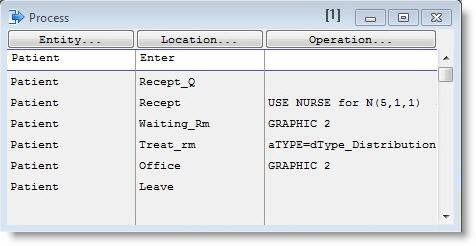
The last step in defining Phase 1 of our model is to define the processing of entities at each location. MedModel simplifies this task by allowing you to select an entity type and then use the mouse to click on the locations in the order in which they will process the entity. Each time you click on a location, a new processing record is added to the Process edit table, defining the process for that entity type at that location. For more information on defining process logic, see Processing and Operation Logic.


Once the basic entity flow has been defined using the point and click method, operation statements are added to the processing logic. The processing logic can be as simple as a constant operation time or as complex as a nested IF...then...else statement.


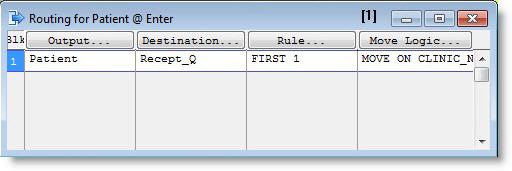
Process editing actually involves two edit tables that normally appear side by side. The Process edit table specifies what happens to an entity when it arrives at a location, and the Routing edit table specifies where an entity is to be sent once processing is complete.

Process Edit Table

Routing Edit Table

Process and Routing Logic

The entire process and routing tables for the Phase 1 model are shown next. The table reads as follows:

  1. Patients entering the system arrive at the front desk (Recept_Q) of the reception area Recep. Each patient spends a Normally distributed time of 5 minutes (± 1 minute) at the receptionist desk.
  2. After filling out some forms, Patients are routed to the waiting room, Waiting, where they wait for the treatment room, Treat_rm, to become available
  3. Each patient receives treatment in the treatment room for a period of time defined by a Normal distribution whose mean is 30 minutes and standard deviation is 5 minutes.

Please Note: As we proceed to the final model, the treatment time will be changed to reflect the actions of both the nurse and doctor. As such, the current time of N(30,5,1) is a placeholder (the last “1” identifies the random number stream).

  1. After treatment, Patients are sent to the Doctor’s Office to complete the care process. Patients may remain in the Office for several minutes or very few. This time variance is shown below as a normal distribution, having a mean of 15 and a standard deviation of 3 minutes. After this time has elapsed, Patients leave the system.

Entity

Location

Operation (min)


Output

Destination

Rule

Move Logic

Patient

ENTER


1

Patient

Recept_Q

FIRST 1

MOVE FOR .5

Patient

Recept_Q

MOVE FOR .3

1

Patient

Recep

FIRST 1


Patient

Recep

WAIT N(5,1,1)

1

Patient

Waiting

FIRST 1

MOVE FOR .3

Patient

Waiting

GRAPHIC 2

1

Patient

Treat_rm

FIRST 1

MOVE FOR .5

Patient

Treat_rm

GRAPHIC 3

WAIT N(30,5,1)

1

Patient

Office

FIRST 1

MOVE FOR .6

Patient

Office

GRAPHIC 2

WAIT N(15,3,1)

1

Patient

LEAVE

FIRST 1

MOVE FOR .2

Patient

LEAVE


1

Patient

EXIT

FIRST 1


© 2012 ProModel Corporation • 556 East Technology Avenue • Orem, UT 84097 • Support: 888-776-6633 • www.promodel.com
